

Often, our customers want to connect IPSec VPN tunnels from our devices to the Microsoft Azure platform. In this guide, we will describe how to accomplish such a setup from our Zyxel Nebula Gateway Series (NSG) step by step.
Topology:
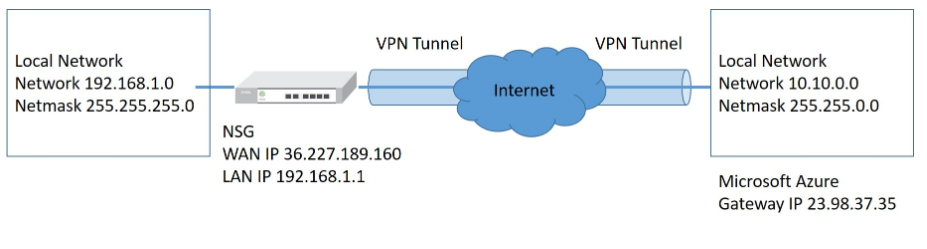
Topology:
Nebula Gateway Setup:
Note: Please note that the NSG needs to have public IP, not behind a NAT-Router.)
1. Go to
"GATEWAY > Configure > Site-to-Site VPN"
2. Select "Outgoing Interface" and "Local networks".
3. Click "Add" in Non-Nebula VPN peers section and configure "Name", "Public IP", "Private subnet" and "Preshared secret".
(10.10.0.4 is a pingable virtual machine in Azure network)
4. In IPsec policy, configure Preset as "Azure", the parameter of Phase 1 and 2 will be loaded by default for Microsoft Azure automatically.
5. Click "OK" and "Save" to apply when everything is done.
Setup of the Microsoft Azure:
Note: Since this is third-party equipment, please note that this setup guide is subject to change and might be different. We do not by any means are liable for any issues which come up by following the below part of the article.
1. Create an Azure virtual network.
"Create a resource > Networking > Virtual network"
Configure required information.

2. Configure virtual network gateway.
"Create a resource > Networking > Virtual network gateway"
Gateway type = VPN
VPN type = Policy-based
Virtual network = Choose the virtual network you created.
Gateway subnet address range = It is OK to use the system default.
Public IP address = Create new with a customized name.
3. Configure Local network gateway.
"Create a resource > Networking > Local network gateway"
IP address = Your NSG Public IP
Address space = The interface address you want to use VPN on NSG
4. Configure Site to Site VPN connection.
"All resources > Virtual network gateway(VPN-GW) > Connections > Add"
Connection type = Site-to-site(IPsec)
Local network gateway = Choose the local network gateway you created.
Shared key (PSK) = Configure key (Remember to be consistent with the configuration on NSG)
Verification of our results
On NSG,
"GATEWAY > Monitor > VPN connection"
On PC(192.168.1.33) which is under NSG's LAN.
On Microsoft Azure, "All resources > Connection(NSG_Azure_VPN)"
On VM(Win10 PC) which is on Azure network.
Comments
0 comments
Please sign in to leave a comment.