

Nebula provides flexible tools for network deployment and management across different organizations and sites. Sometimes you may need to fully replicate the configuration of an existing site to create a new one with the same settings, or move all devices from one site to another along with their current configuration. For these tasks, Nebula offers two separate workflows: replicating and moving a site.
- Synchronization Settings – for applying configuration updates to multiple existing sites.
- Replicate Site-Wide Configuration – for duplicating site-level configurations to new or other sites.
- Replicate Switch Setting – for copying switch-specific configurations.
Synchronization Use Cases
- Updating Guest WiFi settings: Sync SSIDs, authentication methods, and captive portal pages across branches.
- Updating switch port profiles: Apply standardized switch configurations to sites with similar architectures.
- Updating PoE schedules: Adjust power delivery plans to reduce energy consumption outside business hours.
Replication Use Cases
- Before deployment: Copy configurations from a “golden template” site to new locations.
- Rapid rollout: Ensure identical network and security policies across multiple new sites.
- Standardization: Maintain consistent network architecture while allowing per-site customization afterward.
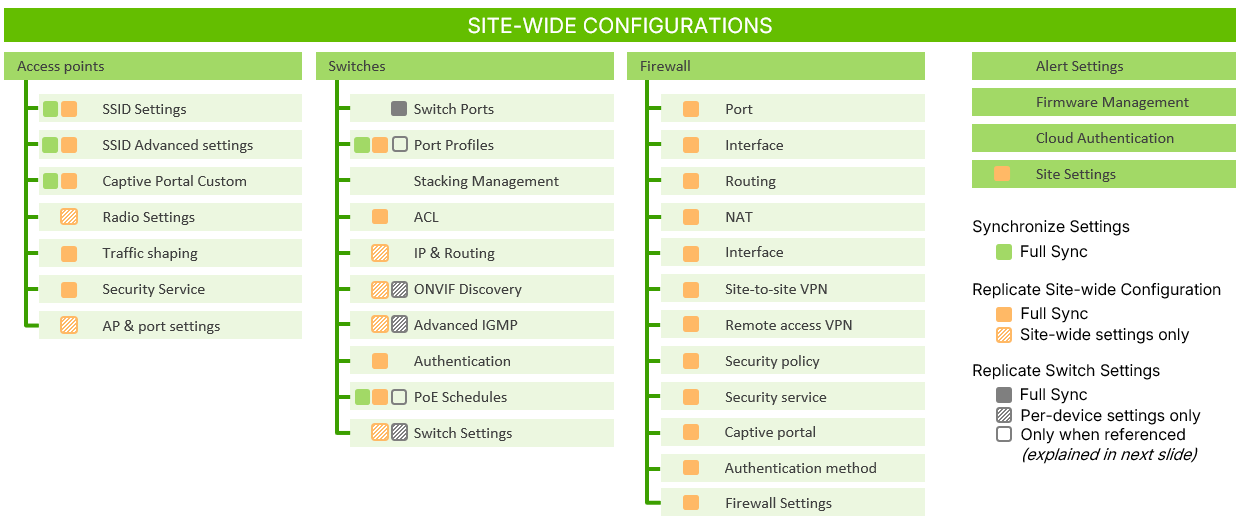
Included vs Not Included in Site-Wide Replication
| Category | Included in Replication | Not Included in Replication | Notes (Moving Devices) |
|---|---|---|---|
| WiFi / AP | SSID settings- Captive portal- Radio settings (site-level) | - Per-device radio overrides | Device history does not transfer |
| Switching | Port profiles- VLANs- PoE schedules- Smart switch config | - Per-port overrides | Admin roles may change after move |
| Security / Gateway | Firewall rules- NAT settings- Routing rules- DHCP server- VPN (site-level) | - Device-specific VPN settings | Licensing must be valid in target org |
| General Site Settings | Alerts & notifications- Cloud auth groups (shared)- Site-wide policies | - Licensing- Device tags- Topology history- Client lists | Some model families may not support full feature set |
| Historical Data | — | - Event logs- Analytics- Client history | Statistics never transfer |
| Referenced Objects | VLAN objects updated/added- Firewall objects updated/added- Address/policy objects updated/added- Port profiles updated/added- SSID profiles updated/added | - Target-only objects removed (or unbound) | Applies only to replication |
Supported Device Types & Limitations
| Category | Details |
|---|---|
| Supported Device Types | - Nebula AP (NWA / WAC series)- Nebula Switches (GS / XS series)- Nebula Gateways (ATP / USG FLEX series) |
| H-Series Limitations | - Certain features may not fully replicate or synchronize on H-Series gateways |
| General Limitations | - Devices must be online/reachable to apply config- Per-device overrides are not transferred- Templates must be compatible with target device models |
Replication Process
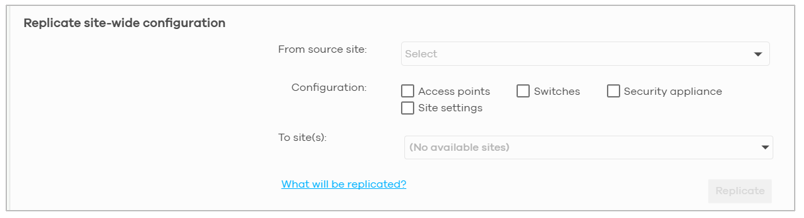
- Navigate to:Organization-wide > Configuration Management > Replicate Site-Wide Configuration
-
Select:
- Source Site
- Target Site(s)
- Configuration Components (AP, Switch, Security Appliance, or Site Settings)
-
Confirm:
- Review the summary window listing all components to be replicated.
- Click Confirm to begin.
-
Replication Behavior:
- During replication, no configuration changes can be made to the source or target sites.
- Upon completion, a Replicate Completed notification bell appears.
- If a conflict occurs (e.g., someone edits settings during replication), the process will revert back both impacted sites to their previous state and display a notification such as:“Replicate Incomplete”
Special Handling Rules for Referenced Objects
Because site configurations may include assignable objects (e.g., port profiles, PoE schedules), NCC applies four rules to ensure consistency during replication:
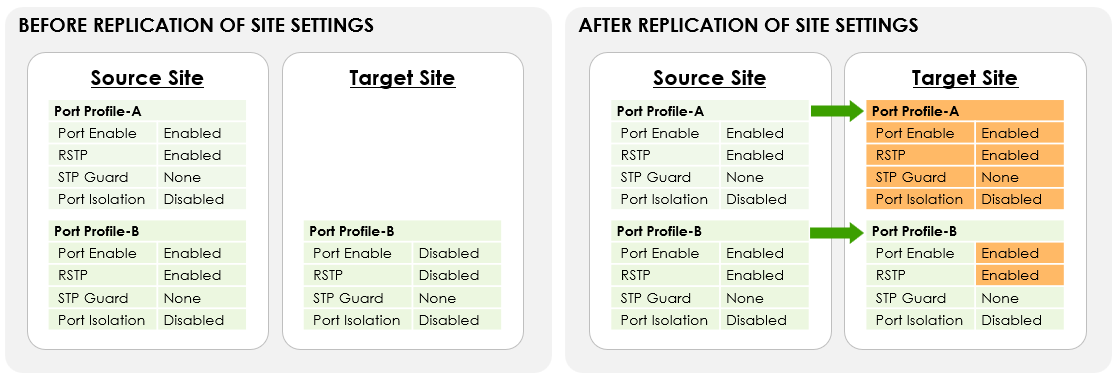
Rule 1 – Update Shared Objects
If an object with the same name exists in both source site and target site, NCC updates the target site’s version to match the source.
Example: Port Profile B exists in both sites — the target’s version is updated to match the source’s settings.
Rule 2 – Add Missing Objects
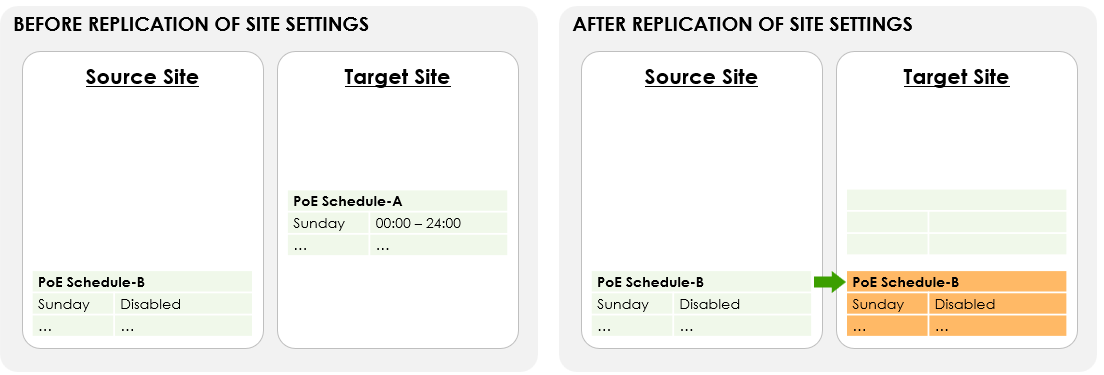
Objects present in the source but absent in the target (e.g., PoE Schedule B) are automatically added to the target site.
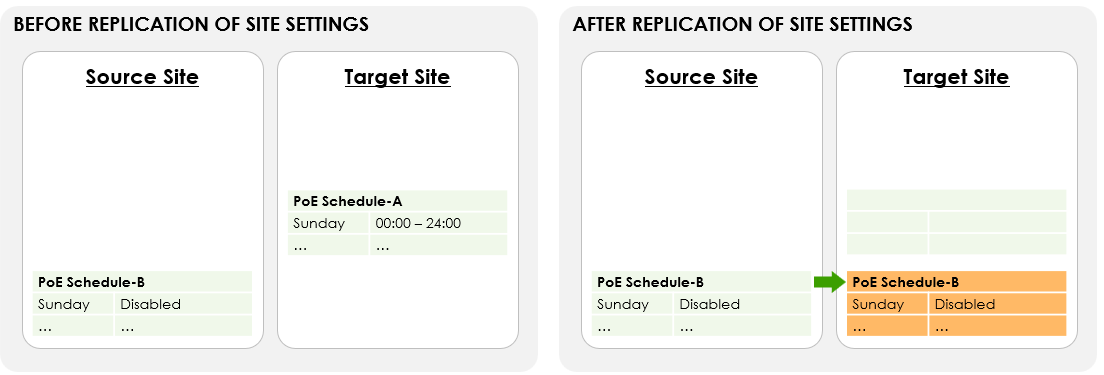
Rule 3 – Remove Unmatched Objects
Objects found in the target but not in the source are removed after replication.
Example: PoE Schedule A exists only in the target — it will be deleted.
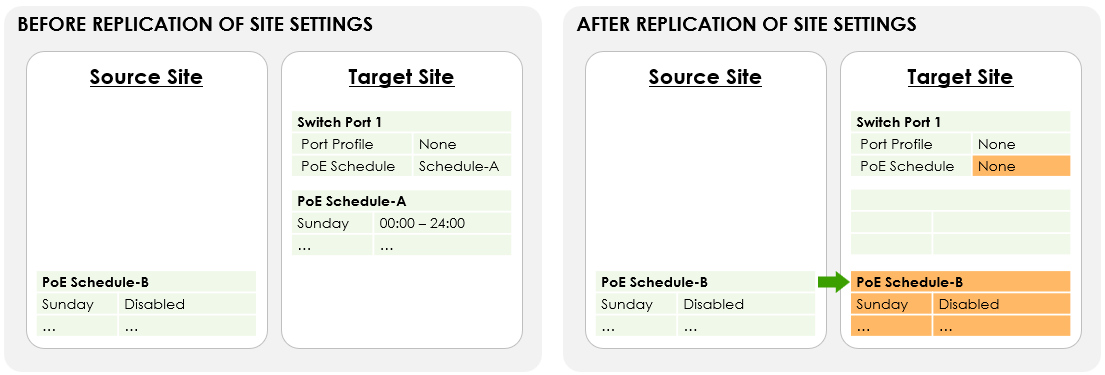
Rule 4- Unbind the Removed object
Additionally, if a removed object was assigned to another configuration (e.g., switch port binding), NCC automatically unbinds it to prevent broken references.
Example: PoE schedule A is removed from the target site after replication-NCC unbinds it from Switch Port 1 setting.
In sum, Replicate Site-Wide Configuration simplifies multi-site deployment in Nebula by enabling administrators to clone an entire site’s configuration to other sites safely and efficiently. Combined with Synchronization and Replicate Switch Setting, it provides a comprehensive, flexible framework for both ongoing network management and large-scale rollout.
Comments
0 commentsPlease sign in to leave a comment.